Showing posts with label iPhone Information. Show all posts

Apple's Free iPhone 4 Cases Come with Pinch of Scorn

Apple made no apologies for the iPhone 4's reception issues in a hastily-summoned press conference Friday. Instead of expressing regret, the company offered free bumper cases and full refunds to anyone who's not satisfied, and basically accused the press of unfairly pouncing on Apple's newest product.

Notably, Apple chief executive Steve Jobs said the issue was "blown so out of proportion, it's incredible." He blasted a report from Bloomberg that said Apple knew the iPhone 4's signal would fade when held over its lower left-hand corner, calling the story "a total crock." He said a New York Times article that blamed software was "patently untrue." And without mentioning Gizmodo by name, he suggested that one blog began posting videos of the iPhone 4's antenna woes because it had an ax to grind. (Gizmodo purchased an iPhone 4 prototype in April from someone who found it at a bar, and now faces legal troubles at Apple's behest.)

Is Media Being Fair?

Hearing all of this, I pondered whether the media did go too far, and whether the iPhone 4 antenna issue is really a "non-issue," as Jobs once said. On one hand, the iPhone 4 gets better overall reception than its predecessors. Problems only arise when you head into areas with poor wireless coverage, where a drop in signal can mean a dropped call. And as Jobs pointed out, the iPhone 4's return rate is 1.7 percent compared to 6 percent for the iPhone 3GS, suggesting that iPhone owners are happier than ever.

On the other hand, you also have to take what Jobs said with a grain of salt. He confessed that the iPhone 4 was dropping more calls than the iPhone 3GS -- less than one out of 100 more, but I don't buy his theory that fewer calls dropped on the 3GS because people were already using their old 3G cases; if that was true, why not compare iPhone 3G dropped call to test that theory? Besides, the iPhone 4's antenna problems occur mostly in areas with poor coverage, so the dropped call rate depends largely on where you are, rendering aggregate data irrelevant.

Return iPhone for Palm Pre Plus?

Also, I don't place much stock in the iPhone 4's low rate of returns. If you're an AT&T customer, your other options are limited. Personally, I'd rather deal with the iPhone 4's problems than take a Palm Pre Plus or Motorola Backflip. That doesn't mean the iPhone 4 death grip is a non-issue, it just means the issue can be overlooked in favor of other factors. And Consumer Reports disagrees.

Ultimately, Apple did the expected by offering free bumper cases to all iPhone 4 owners, and delivering the news with a tablespoon of scorn for the people who were reporting it. That won't pacify people who don't like using cases, especially because Jobs said no one in the industry has solved the problems the iPhone 4 is having. But it will probably give Apple a bit of breathing room until a better solution becomes available.


Theo Pc World 

RIM, Nokia, and HTC Defend Against Apple's Antenna Claims

Apple CEO Steve Jobs' claim that most smartphones have antenna weak spots has come under fire from BlackBerry-maker Research In Motion (RIM), Nokia, and HTC. Apple highlighted at a press event on Friday phones from the three manufacturers as having antenna problems as well, in a bid to address the debate around the iPhone 4 antenna issues, also known as the ‘death grip'.

[See how the iPhone 4 death grip drama unfolded in the Antenna-gate Timeline ]

Following the widely-reported press event on Friday, Apple posted on its website videos showing five modern smartphones suffering from various death grips, or, as Apple calls it, ‘attenuation'. The phones in question, an iPhone 4, a BlackBerry Bold 9700, an HTC Droid Eris, a Samsung Omnia II, and an iPhone 3GS, are all shown losing signal when held in a certain way.

Not Mincing Words

"Apple's attempt to draw RIM into Apple's self-made debacle is unacceptable," said the BlackBerry-maker, who is still the leading smartphone vendor. "Apple's claims about RIM products appear to be deliberate attempts to distort the public's understanding of an antenna design issue, and to deflect attention from Apple's difficult situation.

"One thing is for certain, RIM's customers don't need to use a case for their BlackBerry smartphone to maintain proper connectivity. Apple clearly made certain design decisions and it should take responsibility for these decisions rather than trying to draw RIM and others into a situation that relates specifically to Apple," RIM concluded. Apple is giving away Bumper cases to all iPhone 4 customers to tackle the death grip.

Nokia, whose phones weren't showcased in Apple's attenuation demonstrations, also took offense. "Nokia has invested thousands of man hours in studying how people hold their phones and allows for this in designs, for example by having antennas both at the top and bottom of the phone and by careful selection of materials and their use in the mechanical design," said the Finnish phone maker, who is the world's largest cell phone manufacturer.

HTC also countered Apple's claims that the HTC Droid Eris suffers from the death grip. The Taiwanese manufacturer said that only 0.016 percent of calls to Droid Eris technical support were related to reception issue, compared to Apple's 0.55 percent for the iPhone 4. Verizon of HTC did not disclose how many Driod Eris devices were sold, but the numbers are said to be nowhere near the 3 million mark Apple reached with the iPhone 4 so far.

Antenna Issues In The Spotlight

The iPhone 4 antenna woes have brought into public attention users' gripes with modern smartphones. The Edible Apple blog looked into Nokia's claims of superior antenna performance, only to find that some phones from the company have detailed instructions on how not to hold the phone.

The irony is further uncovered, as the blog highlights users reporting lower signal reception when held in hand for several Nokia models. Nokia was the first company to take a stab at the iPhone 4 antenna problems, when it published an ironic post on its blog on how you can hold a Nokia phone any way you want.

Daring Fireball's John Gruber also uncovered instructions from the HTC Droid Eris user manual, which detail on how not to hold the phone. To understand the irony, Steve Jobs was blasted when he said to a user in an email complaining about the iPhone 4 death grip to just hold the phone in a different way.

Gruber also linked to videos showing attenuation problems with other competing smartphones, like the Palm Pre, BlackBerry 9650 (on Verizon), the HTC Droid Incredible, and the Google Nexus One.

Perhaps the most comical look at the death grip saga comes from a Taiwanese news outlet, which recreated the antenna-gate saga in a video animation. From the same people who brought you the Tiger Woods scandal animation, the video shows Steve Jobs's solution for iPhone 4 users: cutting two of their fingers with a lightsaber.

Theo Pc World 

Apple fixes one iPhone bug as another appears

Apple has issued a fix for one problem with the iPhone as reports start to emerge of another bug.

An iPhone software update has corrected the way that different versions of the handset display signal strength.

But some users are reporting that an earlier update means their 3GS phones now drop far more calls than before.

The news comes as Apple prepares for a news conference in which it is expected to address the ongoing iPhone 4 antenna problem.
Related stories

* Apple to brief on iPhone 4 issues
* Apple admits iPhone signal fault

Rebooting phones

The update for the iPhone iOS software fixes a problem that Apple discovered when investigating reports about reception falling away on the newest version of the handset.

In an open letter, Apple said it was "stunned" to discover that the formula it had been using to calculate how many bars of signal strength to display was "totally wrong". The formula regularly displayed two more bars of strength than it should, the company said.

To correct the flaw, Apple issued a fix that owners can get hold of by connecting their phone to a Mac or PC and updating the device. Analysis of the update shows that it does not alter the underlying formula for calculating strength but changes how many bars a phone displays.

At the same time some owners of the iPhone 3GS are reporting that an earlier update to the handset's operating system made their phone far more likely to drop calls.

The dropped calls occur when the phone suddenly reboots during a conversation.

The Apple support forum dealing with the problem now has more than 36 pages of comments attached to it. Apple has yet to give specific advice about this problem but many users report that restoring the phone's firmware fixes the trouble.

At 1800 BST, Apple is holding a press conference at which it is expected to talk about an ongoing problem with the iPhone 4 antenna.

On this handset the antennas for the different wireless services it can handle are built into the case of the device. Many people have reported losing signal and calls if their hand bridges the gaps between the separate antennas.

++++++++++++
Theo BBC 

iPhone 4 phát lửa làm bỏng tay người dùng

Trang Boygeniusreport đăng bức hình smartphone của Apple bị cháy trong lúc đang cắm cáp kết nối.
Những bức ảnh này cho thấy, phần nhựa của dây cáp bị tan chảy đến mức biến dạng và phía đáy của iPhone 4 cũng xuất hiện vết cháy đen. Chủ nhân của chiếc máy cho biết, anh chỉ cắm cáp kết nối vào iPhone 4, một lúc sau sản phẩm bất ngờ phát lửa. Trong lúc tìm cách cứu vãn, tay của người này đã bị bỏng.
Ngay sau đó, anh ta mang đến trung tâm bảo hành đòi bồi thường 1 chiếc iPhone 4 mới. Tuy nhiên, điều kiện này chưa được đáp ứng với lý do: Máy trong kho đã hết hàng.
Đây trường hợp iPhone 4 phát lửa đầu tiên trong gần 2 triệu sản phẩm được bán ra trên thị trường toàn thế giới.

Theo Slashgear, Vnexpress

15 mẹo sử dụng iPhone 4 và iOS 4

iOS 4 thêm một số tính năng mới đáng chú ý như đa nhiệm, tắt xoay màn hình, hay nâng cấp về nhắn tin, chụp ảnh.
Hệ điều hành mới được Apple sử dụng trên iPhone 4 có nhiều cải tiến hơn so với các phiên bản smartphone của hãng trước đây. Hiện tại, iOS 4 đã có thể cài lên iPhone 4, 3GS và iPod Touch thế hệ ba, các máy cũ như iPod Touch thệ hệ hai và iPhone 3G bị giới hạn nhiều tính năng. iPad thì cuối năm mới được nâng cấp.
Dưới đây là một số mẹo nhỏ sử dụng iOS 4 trên iPhone 4.
1. Khóa xoay màn hình
Nếu như nằm để đọc sách hay lướt web trên Safari, thì nên tắt chức năng xoay màn hình, để máy luôn luôn hiển thị dọc. Chức năng mới được Apple gọi là Portrait Lock, theo đó, người dùng nhấp hai lần lên phim Home, trượt sang phải, nút khóa sẽ nằm trong cùng bên cạnh các phím chơi nhạc iPod.
2. Chạm vào màn hình lấy nét, zoom Camera
iPhone 4 có camera 5 Megapixel và hỗ trợ khả năng zoom. Tuy nhiên, để kích hoạt, người dùng phải chạm vào điểm lấy nét trên màn hình (ví dụ như khuôn mặt), sau đó thanh bar zoom sẽ xuất hiện, cho phép dùng tay phóng to chụp gần hoặc kéo rộng ra lấy toàn cảnh chủ thể.
3. Cập nhật các ứng dụng chạy đa nhiệm (multitasking)
Đa nhiệm là một trong những tính năng mới đáng chú ý nhất trên iOS 4. Tuy nhiên, hiện nay không phải tất cả các ứng dụng đều tương thích với tính năng mới này. Người dùng cần thường xuyên cập nhật phần mềm thứ ba (từ App Store). Với các phần mềm không tương thích, khi chuyển sang ứng dụng khác và mở lại, tiện ích sẽ khởi động từ đầu, không nằm ở trang thái lúc thay đổi.
4. Ngắt các ứng dụng đang chạy
Thông thường, khi mở một phần mềm và bấm phím Home để thoát, mở ứng dụng khác, thì tiện ích trước đó vẫn chạy ngầm. Để thoát hoàn toàn các phần mềm đang chạy trên iOS 4, người dùng có thể bấm hai lần phím Home vào chương trình đa nhiệm, giữ lỳ các icon bên dưới, và nhấn vào dấu "-" để thoát hoàn toàn.
5. Thêm dấu trên một số chữ cái
Trên bàn phím QWERTY của iPhone 4, để thêm một số dấu đặc biệt trên các ký tự như E, U, O, A, người dùng có thể giữ lỳ các phím, các tùy chọn sẽ xuất hiện.
6. Viết hoa toàn bộ các ký tự
Thay vì mỗi ký tự viết hoa, phải nhấn vào phím Shift (ký hiệu mũi tên đi lên), người dùng chỉ cần bấm hai lần, iPhone sẽ tự động cho phép viết hoa toàn bộ. Để trở về bình thường, tiếp tục chọn phím Shift.
7. Chụp ảnh chân dung từ camera phía trước
Tính năng này xuất hiện trên iPhone 4 với máy ảnh VGA phía trước. Theo đó, để tự chụp ảnh mình mà vẫn xem khung hình hiển thị trên màn hình, khi mở camera, nhấn vào nút Switch, máy sẽ chuyển hình ảnh trên camera phía trước.
8. Tạo thư mục và đổi tên
iOS 4 hỗ trợ folder, người dùng có thể kéo các icon ứng dụng xếp chồng vào nhau, máy sẽ tự động gom vào trong một folder, tùy chọn đặt tên sẽ xuất hiện. Để thêm các ứng dụng khác, chỉ cần giữ lỳ và rê vào trong thư mục đã chọn.
9. Tạo một cuộc gọi FaceTime
Nhiều người dùng iPhone 4 đã cố gắng tìm phần mềm FaceTime trên máy, tuy nhiên di động mới nhất của Apple không có một tiện ích riêng cho ứng dụng này. Để thực hiện, người dùng bấm vào điện như tạo một cuộc gọi thông thường, sau đó nhấn icon FaceTime. Hiện iPhone 4 chỉ có phép đàm thoại qua kết nối Wi-Fi.
10. Ẩn ID người gọi
Người dùng có thể ấn Caller ID của mình khi thực hiện một cuộc gọi trên iPhone 4. Để thực hiện, chọn Setting, bấm vào phầm Phone, tiếp tục chọn Show My Caller ID và nhấn Off. (Đây cũng là tiện ích dành cho những người quên số di động của mình).
11. Ẩn một số tính năng trên màn hình
Nếu bạn đưa iPhone cho một người khác dùng mà không muốn họ đi vào một số tiện ích, có thể sử dụng tính năng ẩn các tiện ích này. Để thực hiện, đi vào Settings, chọn General, tiếp tục nhấp vào Restrictions và lựa chọn.
12. iMovie và ảnh
Ứng dụng iMovie for iPhone 4 cho phép người dùng chỉnh sửa phim trên iPhone của mình. Dù không đầy đủ tính năng như trên máy tính Mac, nhưng với nhiều hiệu ứng như Ken Burns, bạn có thể tạo album ảnh và làm dưới dạng đoạn phim khá ấn tượng.
13. Hiển thị file PDF
Phần mềm iBooks cho iPhone có thể hiển thị các file PDF như xem ebook (dưới dạng hình ảnh). Người dùng có thể đưa định dạng PDF thông qua iTunes bằng cách kéo thả vào thư viện iTunes, sau đó đồng bộ thông qua tab Books. Tại đây, người dùng có thể tùy chọn tải file lên máy, khi chọn, trong iBooks sẽ thêm tab PDF mới.
14. Đếm số ký tự trong tin nhắn SMS
Đây là một tính năng mới trên iOS 4. Theo đó, để chọn người dùng đi vào Settings, nhấn Messages và bấm ON trên Character Count.
15. Tìm kiếm Spotlight
Tìm kiếm Spotlight trên iOS 4 có nhiều nâng cấp hơn so với trước. Từ màn hình Home, người dùng có thể tìm cả các ký tự trong tin nhắn. Ngoài ra, máy cũng hỗ trợ tùy chọn từ Web và Wikipedia.

Theo SoHoa

iPhone 4 đã bị jailbreak

Hacker số một bẻ khóa iPhone - Geohot cho biết, đã jailbreak được phiên bản mới nhất, tuy nhiên khẳng định sẽ không phát hành ra bên ngoài.
Bức ảnh chứng minh iPhone 4 đã jailbreak của Geohot.
Trên blog cá nhân, George Hotz (với biệt danh là Geohot) đưa bức ảnh iPhone 4 cài đặt Cydia và cho biết, model này đã bị jailbreak. Geohot viết, việc iPhone 4 cài đặt phần mềm bên ngoài nhằm mục đích cá nhân và sẽ không phát hành ra ngoài, hiện sau khi "vượt ngục", thiết bị hoạt động không còn ổn định.

Năm 2007, George Hotz là người đầu tiên "bẻ khóa" được chiếc di động của Apple khi mới 17 tuổi.

Trong giới "bẻ khóa" iPhone, ngoài Geohot, nhóm hacker khác là Dev Team cũng thường xuyên trình diễn các công cụ jailbreak và unlock máy.
Theo Số Hóa

'Đập hộp' iPhone 4 trắng tinh khôi

Hiện Apple chỉ mới bán ra phiên bản iPhone 4 màu đen, trong khi bản trắng sắp xuất hiện trông thời trang hơn.
Những hình ảnh mở hộp iPhone 4 màu trắng và các phụ kiện theo máy của Apple xuất hiện trên một website Nhật Bản, model sắp được nhà mạng SoftBank bán ra. Trước đó, Apple cho biết họ gặp nhiều thách thức thực sự để sản xuất bản màu trắng. Thiết bị mới phải tới cuối tháng này bắt đầu có mặt trên thị trường.
Dưới đây là loạt hình ảnh iPhone 4 màu trắng và các phụ kiện theo máy.

Hộp đựng với với hình ảnh iPhone 4 vỏ trắng.

Các phụ kiện bên trong.

Máy trắng tinh khi nhìn từ phía trước, kể cả phím Home.

Mặt sau.

Hai cạnh bên.

iPhone 4 được xem là chiếc smartphone mỏng nhất hiện nay, thiết bị dày 9,3 mm.

Nếu như phiên bản màu đen, vẫn sử dụng đường viền kim loại màu bạc,
thì ở model mới, tông thống nhất làm cho máy trở nên nổi bật hơn.

Vẫn là giắc cắm tai nghe 3,5 mm, phím nguồn và mic trên đỉnh.

Camera đàm thoại video phía trước.

Mặt sau là máy ảnh 5 Megapixel hỗ trợ quay video HD, đèn flash.

Phím tăng giảm âm lượng và ngắt chuông.

iPhone 4 màu trắng cùng dock kết nối.
Theo SoHoa (Ảnh: Impress)

iPhone 4 màu trắng và phụ kiện

Cùng ngắm những hình ảnh iPhone 4 màu trắng với phụ kiện bumper chính hãng Apple.
Ảnh: Impress
Theo Số Hóa

Apple on iPhone 4 Antenna: It's the Bars, Silly

Pay no attention to those reports of iPhone 4 reception problems, Apple says. If you see a steep drop in bars when cupping the phone in your hand, the signal bars are just playing a trick on you.

Apple released a statement Friday blaming iPhone software for the way signal bars are displayed. The formula is "totally wrong," Apple said, possibly showing lots of bars even in areas of weak signal strength. In other words, when you think the iPhone 4 is losing lots of reception, it's because the reception was never there in the first place. Apple will release a software update within a few weeks, available for all iPhone models, that more accurately relates bars to signal strength.

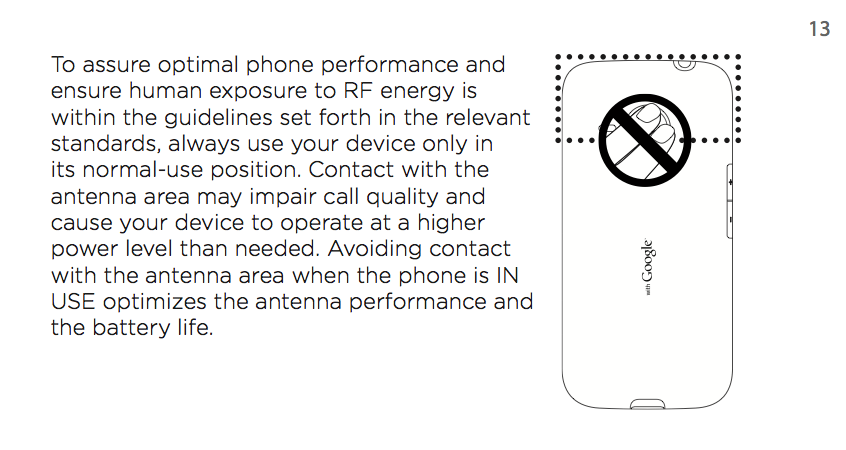
Since the iPhone 4's launch last week, many users have found that covering the metal frame around the sides of the phone, specifically in the lower left hand corner where the antenna is exposed, causes the number of displayed signal bars to drop dramatically. Apple responded by telling people to hold the phone differently or buy a bumper case that prevents skin from interfering with the antenna.

Apple avoids those recommendations in its latest statement, instead calling the iPhone 4's reception problem a perception problem. But is that the right answer?

The iPhone 4 may have the best overall voice reception of any iPhone -- I've heard this anecdotally from friends and in reviews on the Web -- but at least a few tests have raised concerns over data speeds when the phone is held in certain ways, and in certain areas, and Apple hasn't addressed them.

Last week, PC World editor Mark Sullivan tested the iPhone 4 around San Francisco and found dramatic speed drops in four out of five locations. Latency shot upward by thousands of milliseconds in a few locations, and both download and upload speeds were affected. Gizmodo reader Chris Sheehan .

Richard Gaywood, who has a Ph.D. in wireless networking, also tested data speeds. In an area with strong signal strength, Gaywood found no problems, but in an area with a weak signal, average throughput dropped down to nearly nothing when he gripped the phone with a bare hand.

In fairness, none of these tests included other phones for comparison, and signal loss has been reported in other phones including Google's Nexus One. But a thorough test by Anandtech, which measured actual signal strength instead of bars, found that the iPhone 4's signal dropped far more than the Nexus One and the iPhone 3GS when gripped in a bare hand.

Do the data tests -- measured in bits, not bars -- mean that the iPhone 4 is defective, as several class action lawsuits claim? That's for a judge to decide. But unless Apple addresses them, it's still disingenuous to dismiss the issue as a simple display glitch.
  +++++++++
by pcworld

Apple on iPhone 4 Antenna: It's the Bars, Silly

Pay no attention to those reports of iPhone 4 reception problems, Apple says. If you see a steep drop in bars when cupping the phone in your hand, the signal bars are just playing a trick on you.

Apple released a statement Friday blaming iPhone software for the way signal bars are displayed. The formula is "totally wrong," Apple said, possibly showing lots of bars even in areas of weak signal strength. In other words, when you think the iPhone 4 is losing lots of reception, it's because the reception was never there in the first place. Apple will release a software update within a few weeks, available for all iPhone models, that more accurately relates bars to signal strength.

Since the iPhone 4's launch last week, many users have found that covering the metal frame around the sides of the phone, specifically in the lower left hand corner where the antenna is exposed, causes the number of displayed signal bars to drop dramatically. Apple responded by telling people to hold the phone differently or buy a bumper case that prevents skin from interfering with the antenna.

Apple avoids those recommendations in its latest statement, instead calling the iPhone 4's reception problem a perception problem. But is that the right answer?

The iPhone 4 may have the best overall voice reception of any iPhone -- I've heard this anecdotally from friends and in reviews on the Web -- but at least a few tests have raised concerns over data speeds when the phone is held in certain ways, and in certain areas, and Apple hasn't addressed them.

Last week, PC World editor Mark Sullivan tested the iPhone 4 around San Francisco and found dramatic speed drops in four out of five locations. Latency shot upward by thousands of milliseconds in a few locations, and both download and upload speeds were affected. Gizmodo reader Chris Sheehan .

Richard Gaywood, who has a Ph.D. in wireless networking, also tested data speeds. In an area with strong signal strength, Gaywood found no problems, but in an area with a weak signal, average throughput dropped down to nearly nothing when he gripped the phone with a bare hand.

In fairness, none of these tests included other phones for comparison, and signal loss has been reported in other phones including Google's Nexus One. But a thorough test by Anandtech, which measured actual signal strength instead of bars, found that the iPhone 4's signal dropped far more than the Nexus One and the iPhone 3GS when gripped in a bare hand.

Do the data tests -- measured in bits, not bars -- mean that the iPhone 4 is defective, as several class action lawsuits claim? That's for a judge to decide. But unless Apple addresses them, it's still disingenuous to dismiss the issue as a simple display glitch.
 +++++++++
by pcworld

5 cách để sử dụng iPhone như ổ cứng ngoài

Dung lượng của iPhone khá lớn và với mục đích là 1 chiếc điện thoại, chúng ta thường không sử dụng hết dung lượng này. Vậy tại sao không biến iPhone thành 1 ổ cứng gắn ngoài để có thể tận dụng tối đa dung lượng lưu trữ?

Bài viết sau đây sẽ giới thiệu những tiện ích miễn phí giúp bạn thực hiện việc đó.

Nếu bạn có một chiếc iPod, bạn sẽ biết rằng ngoài việc lưu trữ nhạc, iPod có thể được dùng như một ổ cứng ngoài. Đơn giản chỉ cần kết nối iPod vào PC của bạn và có thể dễ dàng truyền dữ liệu theo cách “kéo và thả”. Tuy nhiên, với iPhone, Apple cho bạn một dung lượng lưu trữ lớn hơn, nhiều tính năng hơn, nhưng lại không cho phép dùng nó như một ổ cứng gắn ngoà. Điều này thật đáng tiếc bởi vì iPhone là thứ đồ có thể theo bạn đến bất kỳ đâu. Tuy nhiên với các tiện ích dưới đây, nó hoàn toàn có thể trở thành một ở cứng cầm tay, và bạn có thể khai thác tối đa dung lượng lưu trữ của iPhone.

Những tiện ích cài đặt trên iPhone

Những tiện ích dưới đây được cài đặt trực tiếp trên iPhone hoặc thông qua iTunes trên máy tính để rồi giúp bạn kết nối và chuyển đổi file từ iPhone qua máy tính và ngược lại.

1. Discover | Download

Discover là ứng dụng miễn phí cho phép bạn các tính năng hoàn hảo của một ổ cứng không dây. Với chỉ một mạng không dây nào đó, bạn có thể upload/download miễn phí file xuống iPhone từ máy tính của mình (với điều kiện máy tính cũng đang được kết nối mạng wireless – không dây).

Bạn cũng có thể dùng phương thức WebDAV (WebDAV protocol) để kết nối đến iPhone của mình qua Finder (trên hệ điều hành Mac OS), Windows Explorer (trên Windows) hay Nautilus (trên hệ điều hành Gnome) hay dùng các giao diện Web và kết nối đến iPhone qua trình duyêt của bạn.

Ngoài ra, Discover có chức năng iPhone-discovery để bạn tìm các iPhone khác trong mạng của mình và chia sẻ file với họ. Điều này sẽ hữu ích trong trường hợp bạn muốn chia sẽ file từ máy tính của mình cho nhiều người.

2. Briefcase Lite - | Download (Để download, trước tiên máy tính của bạn phải được cài đặt iTunes)

Ứng dụng miễn phí này cho phép bạn kết nối iPhone với Mac và Linux trong môi trường mạng nội bộ (rất tiếc, Windows không đươc hỗ trợ). Tương tự như Discovery, bạn có thể truyền hoặc lấy file từ iPhone của mình và dùng nó như một ổ cứng để lưu trữ bất kỳ file nào mình muốn.

Tuy nhiên, ngoài hạn chế không hỗ trợ Windows, tiện ích này còn có 1 hạn chế nữa đó là không hỗ trợ di chuyển thư mục, nghĩa là bạn chỉ có thể chuyển hay sao chép file, còn thư mục thì không. Điều này có nghĩa là nếu bạn có rất nhiều file, bạn phải di chuyển hay sao chép từng cái một, thay vì chứa tất cả chỉ trong 1 thư mục. Tuy nhiên, điều này không thực sự quan trọng nếu bạn không làm việc với những dữ liệu quá lớn và số lượng file quá nhiều.

Những tiện ích dành cho máy tính

2 tiện ích giới thiệu ở trên vốn chỉ hỗ trợ cho iPhone, có vài bộ ba phần mềm chủ yếu tập trung hỗ trợ cho máy tính. Bạn chỉ cần install những phần mềm này vào Windows của mình và bạn có thể dùng iPhone như một ổ cứng qua cáp USB. Cũng có vài phần mềm cho Mac nhưng đó là các phần mềm không miễn phí, vì vậy chúng ta sẽ không nói đến chúng ở đây.

3. iPhoneBrowser | Download

iPhoneBrowser là tiện ích miễn phí, cho phép bạn dễ dàng quản lý file trên iPhone từ Windows. Khi đã cài đặt vào Windows của mình, bạn có thể điều khiển toàn bộ hệ thống file của iPhone và “kéo & thả” file. Bạn cũng có thể tiến hành backup để sao lưu dữ liệu trên iPhone phòng trừ trường hợp vô tình xóa một số file quan trọng.

4. DiskAid | Download(Windows) | Download(Mac OS)

Giống như iPhonebrowser, DiskAid là một phần mềm khác giúp bạn duyệt và truyền file đến iPhone của mình. Có ít lựa chọn hơn, nhưng nó có giao diện đơn giản và icon dễ hiểu hơn nhiều. Bạn có thể xem cách sử dụng DiskAid trong bài viết “Biến iPhone/iPod Touch thành ổ cứng” đã được Dân Trí giới thiệu trước đây.

5. Netatalk | Download

Nếu đang sử dụng hệ điều hành Mac, Netatalk cho phép bạn kết nối iPhone và Mac của mình bằng cách dùng phương thức AFP (AFP Protocol). Bạn có thể kết nối iPhone qua chương trình Finder và dễ dàng “kéo & thả” bất kỳ file nào từ máy tính qua iPhone và ngược lại.

Trên đây là những tiện ích giúp bạn có thể tận dụng được dung lượng lưu trữ khá lớn trên iPhone để có thể lưu trữ được những dữ liệu từ máy tính trong trường hợp cần thiết. Hy vọng, những tiện ích này sẽ hữu ích cho bạn.

Theo Dân Trí